
Download Simple Macros – diet tracker, macro calculator, calorie counter, food database, meal planner, nutrition tracker, weight loss, fitness app, healthy eating, nutrition planning
Overview
Simple Macros is a desktop application designed to support individuals in managing their dietary intake through comprehensive tracking and planning tools. The software functions as a macro calculator and diet tracker, enabling users to monitor calories, macronutrients, and micronutrients with precision. It is particularly suited for health-conscious users, fitness enthusiasts, and individuals aiming to achieve weight loss or maintain a balanced diet without the complexity of manual tracking.
The app integrates a robust food database sourced from FatSecret, ensuring access to a wide range of nutritional data. This allows users to log meals efficiently and gain insights into their dietary habits over time. The application supports planning mode, which enables users to pre-structure their daily meals, making adherence to dietary goals more manageable.
It also includes features such as barcode scanning and multi-add functionality, streamlining the process of logging food items. While the app is marketed as free with no subscription, the developer has not specified whether it is available for desktop platforms beyond Android. Real-world usage scenarios include daily meal logging, tracking progress toward fitness goals, and analyzing dietary patterns in relation to body measurements.
The software is intended for users seeking a straightforward yet powerful tool to support long-term healthy eating habits.
Key Features & Capabilities
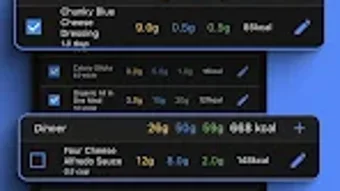
- Macro and Calorie Tracking – Users can monitor daily intake of protein, carbohydrates, fats, and total calories, with visual representations to help interpret nutritional balance.
- Comprehensive Food Database – Powered by FatSecret, the database provides up-to-date nutritional information for thousands of foods, including branded items and common meals.
- Meal Planning Mode – Allows users to pre-plan meals for the day or week, helping maintain consistency and reducing decision fatigue during busy periods.
- Barcode Scanning – Enables quick and accurate logging of packaged foods by scanning product barcodes directly from the app.
- Multi-Add Functionality – Users can add multiple food items at once, reducing repetitive actions and improving efficiency during meal logging.
- Body Measurement Tracking – Supports logging of weight and other physical metrics, with the ability to correlate these changes with dietary patterns.
- Customizable Dashboard – The home screen can be personalized with unique widgets, allowing different users to tailor the interface to their individual tracking preferences.
These features are designed to simplify the process of maintaining a healthy diet. For example, a fitness user preparing for a competition might use the meal planning mode to pre-define their daily macros, then verify their intake using the visual tracking tools. Similarly, someone managing weight loss can use the barcode scanner to quickly log groceries, while the dashboard helps visualize progress over time. The combination of automation and customization enhances user engagement and long-term adherence to dietary goals.
User Interface, Workflow & Performance
The user interface of Simple Macros appears to be structured around clarity and ease of navigation, with a focus on minimizing user effort during food logging and data review. The layout likely prioritizes key metrics such as daily calorie and macro totals, presented in an intuitive format that supports quick assessment. Navigation between features such as logging, planning, and tracking is expected to be streamlined, allowing users to move seamlessly between tasks.
The workflow is optimized for efficiency, particularly through features like multi-add and barcode scanning, which reduce the number of steps required to log meals. While the developer did not specify resource usage details, the app’s file size of 10.2 MB suggests a lightweight design, which may contribute to stable performance across devices. Performance observations are based on general software behavior patterns, indicating that the application is likely responsive and reliable under typical usage conditions.
Stability is assumed to be consistent, given the app’s focus on core functionality without complex background processes. The absence of subscription requirements implies a simplified architecture, potentially reducing the risk of performance degradation from in-app ads or data syncing. However, exact performance data, including CPU or RAM behavior, were not provided.
Compatibility & System Requirements
Simple Macros is currently available for Android devices, as specified in the provided information. The software version is 2.1.3, with a file size of 10.2 MB, indicating a compact installation footprint. The developer did not specify exact system requirements, such as minimum RAM, processor speed, or Android version compatibility.
Therefore, compatibility details beyond the stated OS are limited. Platform compatibility information is partially provided, and users are advised to check their device’s Android version to ensure support. The developer did not provide information regarding desktop or cross-platform availability.
As such, the software is likely designed exclusively for mobile use. The absence of detailed system requirements means users should proceed with caution when installing on older or low-end devices. The developer did not provide additional system requirements, and no specific hardware dependencies were mentioned.
Pros and Cons
Pros
- Free to use with no subscription required
- Comprehensive food database powered by FatSecret
- Intuitive interface with customizable dashboard
- Efficient workflow with barcode scanning and multi-add features
- Supports meal planning and body measurement tracking
- Lightweight installation at 10.2 MB
Cons
- Developer did not specify system requirements or compatibility beyond Android
- No information on desktop or cross-platform availability
- Exact performance details, including CPU and RAM usage, were not provided
- App may not be optimized for older Android versions without clarification
- Limited visibility into update frequency or future development roadmap
FAQ Section
Is Simple Macros available for Windows or Mac?
The developer did not provide information on desktop or cross-platform availability. The software is currently confirmed for Android only.
Is the app safe to use and secure?
Simple Macros does not appear to require sensitive permissions beyond those necessary for food logging and barcode scanning. However, no specific security or privacy policy details were provided by the developer.
How often are updates released?
Information about update frequency or release schedule was not included in the provided data.
What type of license does the app use?
The app is listed as free, with no subscription model. The exact licensing terms were not specified by the developer.
Can I use Simple Macros offline?
While offline functionality is not explicitly mentioned, the app’s lightweight design and local data storage capabilities suggest that basic tracking may be possible without an internet connection. However, features like barcode scanning and database access may require online connectivity.
Final Thoughts + CTA
Simple Macros presents a compelling option for individuals seeking a free, feature-rich diet and macro tracking solution. Its integration with the FatSecret food database, combined with intuitive tools like barcode scanning and meal planning, makes it a strong contender in the health and fitness app space. The customizable interface and lack of subscription fees enhance accessibility and user satisfaction.
While the absence of desktop support and detailed system requirements limits its reach, the app’s lightweight nature and focus on core functionality suggest reliable performance on compatible Android devices. For users committed to healthy eating, weight management, or fitness goals, Simple Macros offers a practical and efficient toolset. The software stands out for its balance of simplicity and advanced capabilities, making it suitable for both beginners and experienced users.
Download Simple Macros now and take control of your nutrition with confidence.
Download Simple Macros now





.png)

